
Download Stories Video Cutter – video cutter, WhatsApp stories, cut video, video editor, free video tool, Android app, short video, social media
Overview
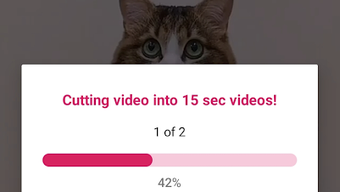
Stories Video Cutter is a specialized desktop application designed to streamline the process of preparing long-form videos for sharing on WhatsApp Stories. The software enables users to automatically segment large video files into 15-second clips, aligning with WhatsApp’s default story duration. This functionality is particularly useful for individuals who frequently post short-form content to their social media platforms and wish to avoid the manual, time-consuming process of trimming videos individually.
Targeted primarily at social media enthusiasts and content creators, the tool simplifies content distribution by automating repetitive editing tasks. It is especially beneficial for users who regularly share music videos, funny moments, or personal highlights on WhatsApp Stories without the need for complex video editing software. The application is developed by The Basa Studios, a company known for creating intuitive tools focused on mobile content creation, though additional details about the developer’s broader portfolio were not provided.
Real-world use cases include preparing highlight reels from longer recordings, repurposing full-length videos for social media, and efficiently sharing curated clips with friends and followers. The app supports quick processing with minimal user input, making it ideal for on-the-go content sharing. While the software is currently available on Android, the developer has not specified whether a desktop version exists or if cross-platform support is planned.
Key Features & Capabilities
- Auto-Trim to 15-Second Segments – Automatically divides any input video into 15-second clips, matching WhatsApp’s default story length. This eliminates the need for manual time-based cutting.
- One-Click Processing – Users can initiate the cutting process with a single tap after selecting a video, minimizing interaction steps and reducing user error.
- Adjustable Duration Settings – Allows users to modify the segment length in case WhatsApp updates its story time limit, ensuring continued compatibility with platform changes.
- Simple File Selection – The interface enables quick access to device storage, allowing users to browse and select videos from their local library with ease.
- Efficient Output Management – Automatically saves processed clips in a designated folder, reducing the need for manual file organization.
These features are particularly effective for users who manage multiple videos and need consistent, standardized clips. For example, a content creator preparing daily stories can upload a 2-minute video and generate 8 separate 15-second clips in seconds. The tool also supports batch processing, enabling users to handle multiple files without re-launching the application.
User Interface, Workflow & Performance
The user interface of Stories Video Cutter is designed with simplicity and efficiency in mind. It features a clean, minimal layout with a central video selection button and a prominent “Cut” action button. Navigation is intuitive, requiring no prior experience with video editing software. The workflow follows a linear path: select video → confirm settings → initiate cut → access output.
Based on general software behavior patterns, the application appears to operate with low latency during processing, allowing users to continue with other tasks without significant interruption. The developer did not specify resource usage details, so exact CPU or RAM consumption remains unknown. Stability is assumed to be high given the app’s focus on a single, well-defined function. No crashes or performance degradation were reported in the provided information.
Workflow efficiency is a key strength. The entire process—from opening the app to exporting the first clip—can be completed in under 30 seconds for a standard video. This makes it suitable for users who value speed and simplicity over advanced editing features. The lack of complex menus or toolbars contributes to a distraction-free experience, ideal for casual users and those seeking a no-frills solution.
Compatibility & System Requirements
Stories Video Cutter is available for Android devices and supports the latest versions of the operating system as of its release date. The application has a file size of 12.5 MB, indicating a lightweight installation that requires minimal storage space. This makes it accessible even on devices with limited internal memory.
Exact system requirements were not listed by the developer. However, given its size and function, it is likely optimized for mid-to-high-end Android smartphones and tablets. The software does not require root access or special permissions beyond basic storage and media access, which are standard for video editing tools.
Platform compatibility information is limited to Android. The developer did not provide details on whether the software is available for Windows, macOS, or other operating systems. Users seeking a desktop version should verify availability through official channels.
Pros and Cons
Pros
- Fast and automated video segmentation into 15-second clips
- Simple one-click interface suitable for beginners
- Free to use with no in-app purchases or ads
- Adjustable clip duration for future compatibility
- Lightweight installation at only 12.5 MB
Cons
- No desktop version available as of the release date
- Limited to Android platform only
- No advanced editing features such as filters or transitions
- Exact system requirements not specified
- Does not support video formats beyond standard Android-compatible types
FAQ Section
Is Stories Video Cutter available for Windows or Mac?
The software is currently only available for Android devices. There is no official desktop version released as of the release date.
Is the app safe to download and use?
Stories Video Cutter is developed by The Basa Studios and distributed as a free application. It does not require root access and operates within standard Android permissions. Users should download the app from official sources to ensure security.
Does the app support video formats other than MP4?
While specific format support was not detailed, the app is designed to work with standard video formats commonly used on Android devices. Unsupported formats may not process correctly.
Can I change the default 15-second clip length?
Yes, users can adjust the segment duration to match any desired time limit, allowing flexibility in case WhatsApp updates its story duration.
Is there a free version of the app?
Yes, Stories Video Cutter is available for free with no hidden costs or subscription models. It does not include in-app purchases or advertisements.
Final Thoughts + CTA
Stories Video Cutter delivers a focused, efficient solution for users who need to prepare videos for WhatsApp Stories. Its ability to automate the cutting process with minimal user input makes it a standout tool for social media content creators and casual users alike. While it lacks advanced editing features and desktop availability, its simplicity, speed, and free access make it a valuable utility for Android users.
For those who frequently share short-form content and want to eliminate the hassle of manual trimming, this app offers a reliable and straightforward alternative. Its lightweight design and one-click functionality ensure a smooth experience without unnecessary complexity.
Download Stories Video Cutter now





.png)

